CSGO500 App: Is There an Official Mobile App?
There is no confirmed official CSGO500 app on Google Play or Apple’s App Store. Mobile users instead open the CSGO500 website through a browser on Android phones, iPhones, and tablets. The site can also be saved to a home screen for faster access.
This page covers Android and iOS use, home-screen setup, mobile features, speed, security, and APK risks. The same account and main platform areas described in the CSGO500 review are available through the mobile site.
Does CSGO500 Have an Official App?
No. The official site and help pages do not point users to a verified store listing or an operator-issued download file.
The CSGO500 mobile version works through the website. It uses the same account and gives access to the main parts of the platform. These include casino games, 500 Originals, cases, case battles, sports betting where offered, profile tools, and the cashier. What appears can still vary by country, account status, device, and current site access.
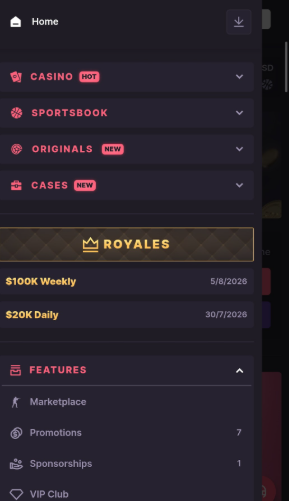
(CSGO500 homepage showing casino, sportsbook, originals, and case sections)
For a native app, you go to an app store and install it on your phone. A PWA, or Progressive Web App, is an application that does something different. It remains on the web but can be accessed via a home screen icon or a new window. If a browser does not fully support PWA, it may instead generate a standard webpage shortcut.
Saving csgo500.com does not install a native CSGO500 app on your phone. It only gives quicker access to the official site. Users should avoid files or apps that are not shared through a verified CSGO500 channel.
How to Install the CSGO500 Web App (PWA)
The CSGO500 app can be saved to a mobile home screen without native software. Browser wording varies, but every option still opens the web platform.
Add to Home Screen on Android
To access CSGO500 mobile access on Android:
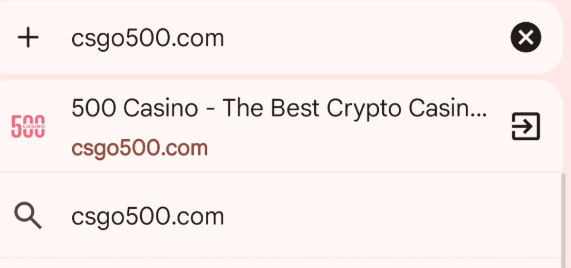
- Open Google Chrome and type csgo500.com into the address bar. Check the spelling before signing in, mainly when a link came from an advert, email, or message.
- Press the three-dot menu next to the address bar.
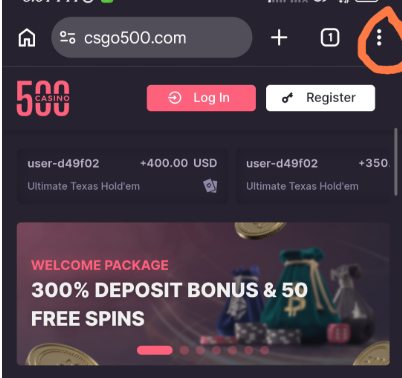
(Tap the 3 dots on the top-right corner.)
- Select "Install and create shortcut."
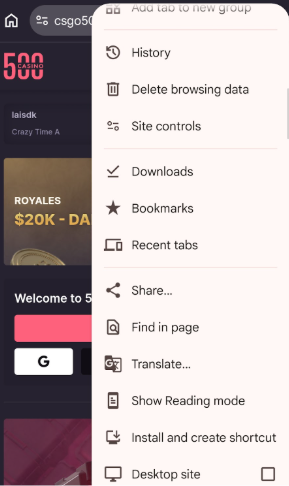
(Google chrome menu with “install and create shortcut”)
- Check/edit the name that appears. Then press install to add the icon.
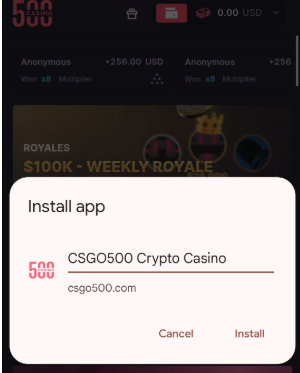
(Step for editing the name and installing CSGO500 mobile web app)
- The icon should appear on the Android home screen. On some phones, it opens the site in a clean, app-like window. On others, it opens the saved page inside Chrome.
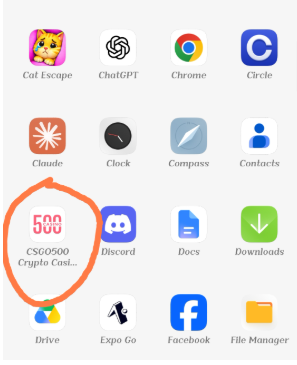
(Android app drawer with the installed CSGO500 PWA)
Add to Home Screen on iOS
Open Safari on your iPhone or iPad and enter csgo500.com. Before entering your login details, double-check that the website address is correct.
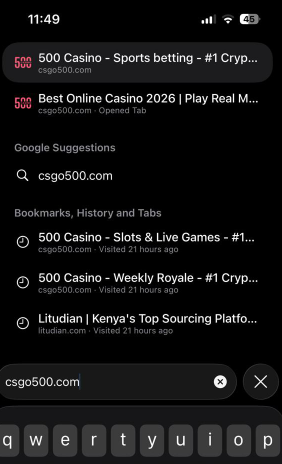
(Entering the CSGO500 official domain on iPhone Safari)
Then follow these steps:
- Go to the page menu or click the “Share” button in Safari.
- Look down and select “Add to Home Screen.”
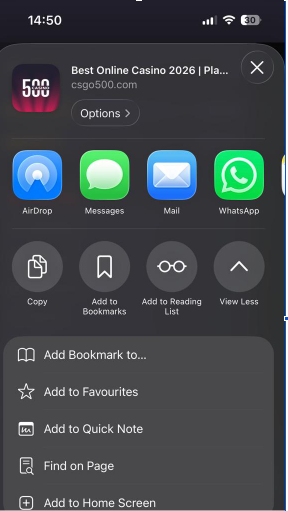
(iPhone Safari share menu showing the “add to home screen” option for CSGO500)
- Click the "Open as Web App" option if it appears.
- Change the name if necessary, then select "Add."
Safari places a CSGO500 mobile app icon on the home screen. It may open in a simple, app-like view, but it still runs through Safari’s browser system.
Removing the icon only removes the shortcut. It does not close or delete the account. The site can still be opened in Safari as usual.
CSGO500 Mobile Features
The CSGO500 mobile app gives access to games, account tools, and payment areas. Some features may vary by location or account status.
Games and Cases
Mobile users can explore the casino lobby, 500 Originals, cases, case wars, and open sports markets. There are also search filters and sections like "New Releases" and "Jackpots" in the casino part. Certain titles may not be available in all countries.
The mobile platform uses taps rather than mouse clicks on computers. Game windows, case selections, fight seats, and betting markets have all been reduced in size to fit smaller displays. Landscape mode may be more appropriate for some games. Speed and layout may depend on the device or the game provider.
Account Management
The CSGO500 mobile website and desktop site both use the same account. Sign in, check your funds, view your profile, analyze account activities, and access security settings.
The profile section includes information for each game mode. It also displays the profit and loss data from the previous bets. This allows users to view recent activity without having to install a separate application.
Two-factor authentication is managed through the profile area. It works with a supported authenticator app and recovery codes. Open bets, case history, rewards, and payment records appear in their own sections. Names and menu positions may change after site updates.
Payments on Mobile
Deposits and withdrawals can usually be started from the mobile cashier. Users pick the type of payment, view the options shown for their account, enter the needed details, and confirm each step.
The same CSGO500 deposit rules apply on mobile and desktop. The methods shown may depend on country, currency, account checks, and provider access.
Mobile cashouts also follow the CSGO500 withdrawal rules tied to the account. Using a phone does not change balance terms, review checks, or the methods offered.
Before you confirm, review each transaction screen. Don't save payment information in the browser, and log out of the Cashier after using it on a shared computer.
Mobile Performance and User Experience
CSGO500 is compatible with mobile browsers, but the user experience may differ depending on the phone. Device age, browser version, network quality, and server traffic all can have an impact on performance.
Responsive Design
The CSGO500 mobile website readily adapts to smaller screens. You can use your phone or tablet to get to the Cashier, game sections, account pages, and menus. Text and balances are legible even without continuous zooming, and buttons are touch-sensitive.
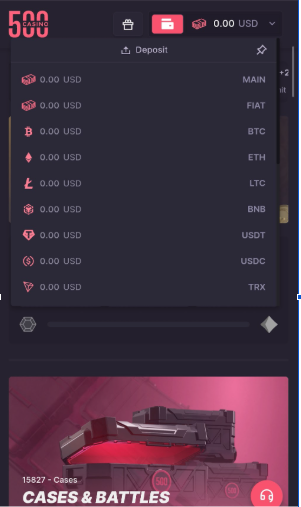
(Responsive CSGO500 cashier interface with legible wallet balances)
Some pages still hold a lot of content. The casino lobby and sportsbook may need more scrolling or extra taps on a small screen. That is common when a large gaming site is used in a browser.
Turning the phone sideways may give more space for some games. The result depends on the browser, phone settings, and the game itself. Tablets may also show a wider layout than phones.
Loading Speed
Each user will encounter a varying loading speed. Menus may load faster on a newer phone with good Wi-Fi. Older devices or weak mobile connections may be the source of slow-loading pages, images, and games.
Casino games frequently load additional files from third-party suppliers. There are also fresh odds and event details on the sports sections. Even when the main site is operational, these tasks may create delays.
Close any inactive tabs, update your browser, and use a reliable connection. However, these methods will not resolve issues with the server, device, or game provider. Phones are not always at fault.
Security
When logging in on your phone, use the official CSGO500 URL. The website supports HTTPS and allows you to log in using two authenticator applications that have been approved. Recovery codes should be kept private. If possible, keep them away from your phone.
Keep your browser and phone's software up to date. Do not log in via public Wi-Fi, shortened links, or sites sent in unexpected messages.
You must also utilize the correct domain to determine CSGO500 legitimacy, as counterfeit sites may copy its login page. A saved home-screen icon may reduce typing errors, but double-check the URL address before entering personal or financial information.
Should You Download Third-Party APKs?
No. Do not download a CSGO500 APK from unofficial sites, file-sharing pages, messaging groups, or third-party app stores. CSGO500 does not currently offer a confirmed native Android file through its official site or Google Play. There is also no confirmed operator-issued CSGO500 iOS app in Apple’s App Store.
Searches for “download CSGO500 app” may lead to APK pages. An APK is an Android install file used outside Google Play. With an unofficial file, users cannot easily tell who made it, whether it was changed, or what data it collects.
The risks are real. A fake app may copy the login page, steal passwords and two-factor codes, request full phone access, or modify payment information. An old file may also open broken or harmful links. Simply because the app works doesn't mean that the official CSGO500 casino approved it.
Use the mobile page instead. After inputting the official address in a compatible browser, save it to your home screen. Before you sign in, verify that the connection is HTTPS and that the spelling is correct. Just because an unknown program bears the CSGO500 app logo or branding does not imply that it can access your camera, storage, accessibility, or notifications.
The same warning applies to iPhone profiles and third-party install services. A polished “download CSGO500 app” page can still be false.
FAQ
Does CSGO500 have an official mobile app?
No official CSGO500 app is currently confirmed on Google Play or Apple’s App Store. Mobile users open the platform through its responsive website. A browser can also save the official site to a home screen as a web app or shortcut. This gives faster access, but it does not turn the site into native phone software.
Can I use CSGO500 on Android and iPhone?
Yes, CSGO500 mobile is accessible on Android and iOS devices using supported browsers in countries where the service is offered. Android users can visit the site via Chrome, while iPhone and iPad users can utilize Safari. There is no need to download from the app store. Game features and availability vary depending on device, browser, country, and current site access.
How do I add CSGO500 to my home screen?
Open csgo500.com in Chrome on Android or Safari on iOS. Use the browser menu and choose “Add to Home Screen.” Chrome may show “Install app” or “Create shortcut.” Safari may offer “Open as Web App.” Confirm the icon only after checking that the page uses the official CSGO500 domain.
Is the CSGO500 mobile version different from the desktop version?
CS:GO500's desktop and mobile versions can be accessed using the same account. The mobile version design is simple enough to adapt to smaller touchscreens. Landscape mode may cause menus to fold, content to stack vertically, or even some games to perform better. The outcome is heavily influenced by screen resolution, browser compatibility, and developer. The website remains in use, not a separate app.
Is it safe to download a CSGO500 APK?
A third-party CSGO500 APK should not be treated as safe or approved. Such files may be changed, outdated, or built to steal login and payment details. Since no confirmed official APK is offered through CSGO500 or Google Play, use the verified mobile site and create a home-screen shortcut from your browser.
Ready to open CSGO500?
Use the official referral link, check the latest promo terms, and only play with funds you can afford to lose.