CSGO500 Deposit Guide: How to Add Funds to Your Account
A CSGO500 casino deposit starts in the cashier. You choose crypto, real money, vouchers, or skins. Each option has its own steps. Your country and account status can change what you see too.
This page shows you how to deposit on CSGO500. It covers the main payment routes, the limits to check, bonus rules, timing, and CSGO500 KYC checks. Common payment problems are covered too, minus the complicated language.
CSGO500 uses several balance types. So the balance you choose before paying matters. Crypto usually goes into the matching coin balance. Real money, vouchers, and skins usually go into MAIN. That choice can affect withdrawalslater.
The live cashier gives the final answer for your account. Payment wording can change. Provider access also differs by country. Check every field before you send funds or skins.
How to Deposit Money on CSGO500
A deposit takes place through the cashier. You need a registered account first. Sign in through the CSGO500 login page on the official domain. Then follow the route shown below.
Open the Cashier
Navigate to your account area at the top of the screen. Open the cashier tab. Press the deposit tab. Confirm which payment method you wish to use from the current list. Remember that MAIN and Coin balances follow different withdrawal rules. A wrong choice creates extra confusion later. For example, a Bitcoin transfer normally enters your BTC balance. A card payment normally enters MAIN.
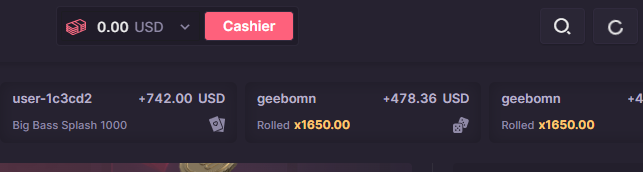
Choose a deposit category
The Cashier organizes CSGO500 payment methods into simple categories. They include crypto, cash, vouchers, and skins. Some users may also see a Buy Crypto option. Choose the category that applies to the funds you intend to use.
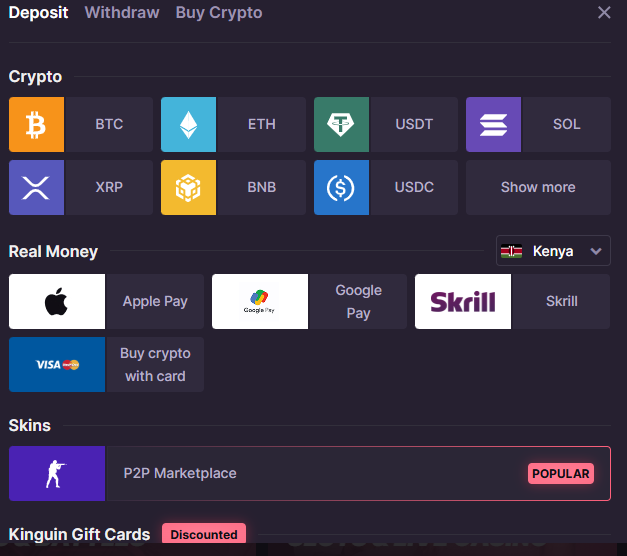
(CSGO500 casino deposit categories and deposit options)
Select the method and amount
Simply choose your favorite coin, card, voucher, or skin. The cashier will display the most recent minimum amount required for that method. Enter a figure that exceeds the CSGO minimum deposit requirement. Skin owners can choose appropriate items from their Steam library. Greyed-out skins cannot be utilized. Items without prices on the site are still unavailable. Check the amount and currency before proceeding.
Confirm all payment details
When you deposit cryptocurrency, you will be issued a wallet address. Some coins require you to select a network. Before sending money, carefully review the address, coin, and network. Card and e-wallet users should follow the instructions provided by their service providers. A bank might want additional proof. People that use vouchers just input a valid code. Skin users should follow the instructions on the website for trading on Steam.
Check the credited balance
Check your account balance again after the payment has been processed. Deposits made with a card or wallet typically appear within a few minutes. Crypto deposits require enough network confirmations. Skin deposits do not appear until after the trade is completed. And lastly, make sure you're looking at the correct balance.
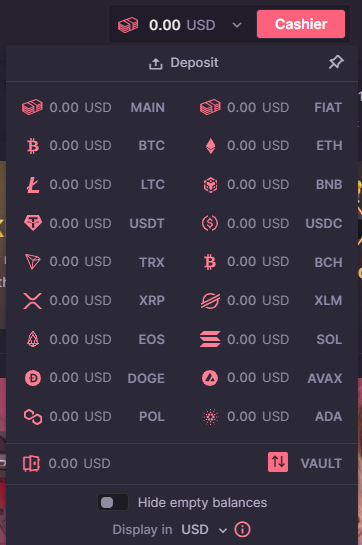
(CSGO500 MAIN, FIAT, and digital coin balances)
CSGO500 Minimum Deposit
The CSGO500 minimum deposit varies depending on the payment method.
Skin prices fluctuate with the market. Today, an item worth approximately $0.30 can qualify. Still, someone of greater worth could be stopped. Skins without a price tag are likewise not accepted.
Fiat minimums vary according to the payment method. Cards can have one constraint, while digital wallets have another. The total amount charged may also change depending on the exchange rate.
Minimums for crypto vary by coin. A dollar amount won't work for all assets. Coin prices and network rules both have an impact on the overall amount.
Do not give less than the amount shown. The deposit may not show up, or support may need to review it. If the price fluctuates quickly, round the number up somewhat.
Before you make a payment, go to the correct Deposit page. You may check your current limit in the Cashier area. Just before sending the funds, double-check everything.
Bonus eligibility may also be influenced by the minimum deposit. The welcome bonusincludes a first deposit of more than $25. A lower payment may reach the Cashier limit but not the bonus.
The type of balance is also relevant. Real money, vouchers, and skins are deposited into the MAIN balance. Crypto deposits are sent to the matching coin balance. Always check the balance menu before reporting missing funds.
CSGO500 Deposit Methods
CSGO500 accepts cryptocurrency, real money, gift cards, and skins. The specific options available to you are determined by your location and the configuration of your account. The live Cashier just displays to you the options available to you. This implies two people may see different possibilities. The options listed are the current methods for adding money to your CSGO500 account.
| Funding route | Best fit | Main point to check |
|---|---|---|
Crypto | Users holding supported coins | Coin, address, and network |
| Bank cards | Standard card users | Bank approval and MAIN balance |
| E-wallets | Mobile or wallet payments | Country access and provider fees |
| Local methods | Regional payments and vouchers | Current Cashier availability |
Skins | Users holding CS2 items | Item value and trade status |
Before you choose a payment method, make sure of the following three things:
- Which amount will receive the deposit?
- How much does the Cashier need to see?
- How do I withdraw later?
The easy option may not be the cheapest. Even if the crypto minimum is low, customers should nonetheless check their wallets and networks. This is one manner in which card deposits are made easier. The bank could still decline the payment.
When you deposit skins, you do not have to pay the bank, but the Steam trade rules still need an additional step. And in hindsight, vouchers may appear to be simpler, but a bad code seller might still cause issues.
Choose a method of payment that makes sense for you, and follow each check carefully.
Cryptocurrency
A CSGO500 crypto deposit starts under Crypto. Choose the coin first. The site creates a deposit address for the selected asset. Some coins also offer several networks. Match every network field with your sending wallet.
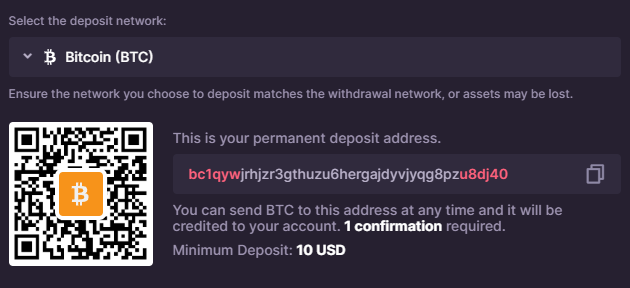
(CSGO500 casino deposit with crypto)
Some of the official payment options include Bitcoin, Ethereum, Litecoin, and Tether. Each coin has its own balance, so if you deposit BTC, it will be allocated to BTC rather than MAIN. This also influences how you can withdraw the funds later.
Before sending cryptocurrency, be sure the first and last characters of the wallet address are the same. Whenever feasible, check the whole address. If you use the incorrect network, you risk losing your funds.
Crypto funds appear after the network confirms them. If you pay the correct network fee, the transfer may be faster.
Never use a previous wallet address again without first verifying it. Every time, open the page with the most recent deposit and copy the address.
Bank Cards
Card deposits will appear under "Real Money" when they are available. The website lists Visa and Mastercard as card payment alternatives. Prepaid and virtual cards may also work, but you should keep your proof of purchase.
Each payment still requires approval from the bank or provider. Daily limitations, fraud checks, repetitive tries, and regional blocks all have the potential to influence the outcome. If a payment fails, refer to the final error message. Often it points to the cause.
Card deposits are applied to the main balance. There are no direct withdrawals to a card. Following completion of any applicable wagering and account checks, players can withdraw using supported crypto or qualified P2P products.
E-wallets
The availability of digital wallets is determined by your country and provider access. Apple Pay and Google Pay are two of the legitimate CSGO500 payment methods listed on the official website. Those who meet the requirements can access the services under Real Money.
The payment process is comparable to using a credit or debit card. Choose an amount, authorize the payment, and hand it back to the cashier. The money will appear in your MAIN balance.
Before confirming, verify the wallet's currency and any provider costs. On the final payment screen, check for any additional expenses.
Local Payment Methods
Local payment options are only available for accounts that are eligible. When you pay, the clerk confirms your country, currency, and source. Methods that are not supported remain hidden.
Different locations also have various bank transfer options. Check the Cashier when logged in to your account for the most accurate results.
Deposit Processing Time
CSGO500 deposit times fluctuate depending on the payment type. Payment approval and account credit may happen at different times. Real money deposits are typically made immediately. But they can sometimes take a few minutes.
The Help Center advises opening a ticket after one hour. First, review the payment status. Some banks place a temporary hold after a failed attempt. A hold looks like a charge, though the bank later reverses the amount.
Crypto deposits wait for blockchain confirmations. Bitcoin currently credits after one network confirmation, according to the Help Center example. Other coins use the number shown on their deposit page.
Network traffic and the sending fee affect the wait. For example, your wallet might mark a BTC transfer complete. The site still waits for its required confirmation. Wallet status and casino credit are separate stages. Check the transaction hash before contacting Support.
Low network fees may potentially slow down a cryptocurrency deposit. Your wallet might indicate that the transfer is complete. The casino might still be waiting for enough confirmations to arrive.
Look up the payment using a blockchain explorer. Verify the transaction hash, destination address, coin, and network. Also, ensure that the amount fulfills the deposit minimum.
Voucher deposits are subject to successful code checks. A typo can prevent redemption. Codes may also be expired, unsupported, or used.
Skin deposits are made via Steam and peer-to-peer transactions. First, the trade has to be completed. The website adds value to your balance.
If a payment is missing, follow the steps below:
- Check your transaction history.
- Check that you are viewing the correct balance.
- Check your email for a communication from the payment provider.
- Check if there are any KYC alerts.
If all the above fail, contact support via live chat or a support ticket. Share the payment reference, amount, time, and method. However, do not post entire card numbers as screenshots. Also, do not share your password, recovery codes, or other login information.
CSGO500 Deposit Bonus
CSGO500 is now offering a welcome package for new users. Players can choose to play at the casino or the sportsbook. Both deals need a minimum commitment of more than $25. Payment must be paid in the account within 7 days of registration.

(CSGO500 deposit bonus on your first deposit)
The headline offer gives 300% of the deposit. The maximum listed reward reaches $15,000. But the full amount does not enter your cash balance. Instead, the site adds the amount as rakeback credit. You earn $1 for each $400 wagered. The reward period lasts 90 days.
The casino package also includes 50 Pragmatic Play free spins. The current offer gives ten spins on five games.
Those games include:
- Sweet Bonanza
- 500 Rush
- The Dog House Multihold
- The Hand of Midas
- Kingdom of Atlantis Jackpot Play
You have 48 hours to redeem your free spins. They may not be available everywhere, and blocked spins cannot be replaced. Any winnings are added to the bonus amount and must be wagered 40 times before withdrawal. The bonus is only valid for 14 days.
Bonus bets have a $100 maximum. Some games and products stay blocked. Game RTP can also affect wagering progress.
The sportsbook package adds a matching free bet. The free bet limit reaches $500. Qualifying odds range from 1.60 to 6.00.
KYC Requirements Before or After Depositing
CSGO500 uses KYC checks to verify the identity, age, location, and ownership of payment methods. Some players are able to deposit before verification. Some may receive a document request during a deposit examination or before withdrawing assets.
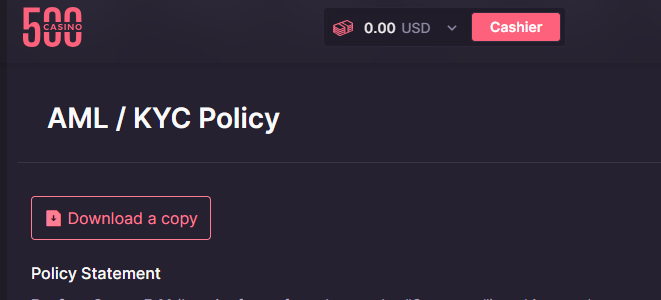
(CSGO500 AML/KYC policy statement)
Standard verification usually needs two items. First, upload both sides of an identity card. Second, upload recent proof of address. Accepted examples include a bank statement, utility bill, or government letter. The document must be less than six months old.
Payment checks may demand further documentation. A flagged card deposit may require a photo to prove card ownership. Prepaid cardholders should also keep their purchase receipts.
Large transactions or unusual payment patterns may require a closer review. In high-risk situations, the operator may seek source-of-funds documentation. Clear and complete files can help prevent delays.
Use this checklist:
- Display all corners of papers.
- Make sure all text is readable.
- Avoid glare or blur.
- Don’t crop or edit files.
- Check the expiry dates of your documents.
- Names must match across all records.
Use the same legal name for all account, card, wallet, and KYC documents. Mismatches might cause the review process to be delayed.
The time required for KYC varies depending on the case. Basic ID verification is usually rapid, but checks on payment ownership can take longer.
Don't create a new account while the review is ongoing. On the platform, each user can only have one account. If you attempt to bypass the checks, you may encounter restrictions or have your account terminated.
Check your email and the account page for new requests. Reviews may include checks for email, steam, KYC, and scams.
Documents can only be uploaded in the official account section. Never transmit files to private communications or social media accounts you don't recognize. Contact customer supportif any of the steps are unclear.
Get your documents ready before beginning the review. This saves time and prevents failed uploads. Place your ID on a flat surface with adequate lighting. Check every image before uploading it. It is critical that your name and document number are simple to read.
Display the entire page as proof of address. Cropped statements may hide important information. Payment evidence should prove that you own the item without revealing sensitive information.
Common Deposit Problems and Solutions
Most of the problems with deposits fall into a few common patterns. First, check the message that appears on the page. Then use the matching solution as described below:
Card deposit declined
Begin by reading the final payment error. Common reasons include daily spending limitations, bank blockages, or incorrect card information. If many attempts are unsuccessful, additional provider checks may be required. Additionally, ensure that the card has enough funds and that online payments are possible. Your card name should match the name on your account. After a few unsuccessful efforts, take a break before attempting again. Use a different payment method only when it shows in the Cashier.
The payment falls below the minimum.
Return to the same deposit subpage. Read the current minimum for your method. Crypto users should also include any sending fee. Send a fresh payment only after checking the full amount. Do not split one required minimum across several transfers.
Payment charge shown, but balance stays empty
Your payment may still be waiting with your bank. Some banks will put the funds on temporary hold until the payment is fully approved. Although there is a pending hold, this does not imply that CSGO500 has received the payments. If a payment is denied, the bank usually releases or returns the funds. If there is no balance after an hour, submit a support ticket. Include the provider, date of service, monetary amount, and reference number.
Crypto deposit missing
Use a blockchain explorer to view the transaction. Verify the number of confirmations it has received. Next, check the amount, network, coin, and wallet address. For Bitcoin, the current Help Center example needs one confirmation. Check the relevant deposit page, as other coins might have different regulations. The transfer may be slowed by a low network charge. Sending less than the required amount could also potentially lead to issues.
Wrong crypto network used
Reach out to Support and provide the transaction hash. Don’t send another test transfer, as this could make the issue worse. In truth, there is no assurance of recovery. Once confirmed, blockchain transfers are typically not reversible. Always verify the wallet address and network before sending funds.
Voucher code rejected
Copy the code from your Kinguin inventory again. Remove any spaces preceding and following it. Then choose Kinguin Gift Card at the Cashier. PaySafeCard codes cannot be used directly. You must enter a valid Kinguin BUX code.
Skin appears grey
Choose another skin. Greyed-out or unpriced items cannot be deposited. Trade locks can also obstruct an item. Access may also be impacted by the site's current pricing policies.
Steam trade completed, but balance remains missing.
Wait for the website to provide an update on the transaction status. According to the Help Center, this usually just takes a few minutes. If the balance has not been restored within 15 minutes, contact Support. Prepare the screenshots and trade references.
A wrong balance appears
Check the balance selector first. Deposits made using crypto are credited to the balance of the matched coin. Skins, vouchers, and real money all enter MAIN. When you claim rewards, they are added to the amount you specified. Check each amount before contacting Support.
CSGO500 deposit pending
First, validate your transaction history and email address. Check for any updates from the payment provider. Log in to the Account page and check for any KYC alerts. If the deposit is still missing, please contact the live chat or create a ticket. Include your payment method, amount, time, and reference number. Never expose your password, two-factor authentication code, or Steam API key.
Is It Safe to Deposit on CSGO500?
CSGO500 uses several payment and account safeguards. No gambling site removes every risk. Your habits still matter during each CSGO500 casino deposit.
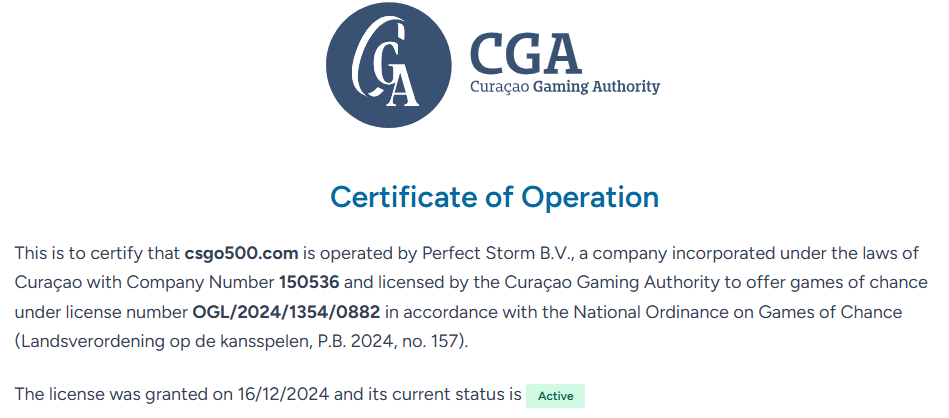
The site operates under Perfect Storm B.V. The Curaçao Gaming Authority lists license OGL/2024/1354/0882 as active. The certificate covers csgo500.com, 500play, and 500.casino. Nine Yards Limited handles payment and support services.
The site uses HTTPS. This protects data moving between your browser and the site. HTTPS does not protect users who visit a fake copy. Check the domain before login or payment.
Two-factor authentication improves the security of your account. To enable 2FA, navigate to the profile page. Authy, LastPass Authenticator, and Google Authenticator are among the available authentication options. Keep the recovery codes offline. Do not share them. Staff at casinos should not request 2FA codes or passwords.
Phishing attacks are more likely to target Steam users. Fake websites often imitate Steam login pages and trading profiles. Before using the Steam login, make sure you're logged into the official Steam Community.
Be wary if another page asks for your password again. That is a red flag. Close the page and go back to the official site.
Review every skin trade carefully. Compare the account name, items, and offer details. Scammers often replace a real offer with a copy.
Crypto users should check five items:
- Asset
- Address
- Network
- Minimum
- Network fee
Card users should keep payment proof. Voucher users should buy codes from the named source. Everyone should review account alerts.
KYC and fraud checks add more controls. These checks verify identity and payment ownership. They also slow selected payments.
Useful safeguards include:
- HTTPS on the official domain
- Optional two-factor authentication
- KYC and fraud reviews
- Payment ownership checks
- Transaction history
- Account support channels
Major risks include:
- Fake login screens.
- Wrong cryptocurrency networks
- Replicate Steam trade offers.
- Passwords exchanged.
- Reused address.
- Unregulated voucher vendors.
Don't share your passwords and make sure they are strong. If you use a public computer, you should always log out. Get in touch with Support right away if you see anything fishy going on.
Safety also starts before payment. Check local gambling rules first.
Review deposit and withdrawal terms together. A deposit route may look convenient, then the later cashout route may not suit you. Card deposits are a good example. They enter MAIN, but direct card withdrawals are unavailable. Reading both sides helps prevent a bad payment choice.
Keeping track of each payment is crucial. Remember to save both the cash receipt and the transaction reference number.
Crypto users should keep their transaction hash. Players who buy skins must maintain their Steam transaction record, while those who buy vouchers should keep their receipt.
These details can help reviews move faster. They also make it simple to track how much you've spent on each balance.
Frequently Asked Questions
What is the minimum deposit on CSGO500?
The exact limit may depend on the payment type, country, and account. The published CSGO500 minimum deposit begins at around 30 cents for skins. Real money deposits are from about $3, and crypto deposits are from about $0.60. Please check the live Cashier before you send any cash.
Which payment methods are available?
You may currently pay for CSGO500 with cryptocurrency, cards, wallets, vouchers, or skins. Official examples include Bitcoin, Ethereum, Visa, MasterCard, Apple Pay, Google Pay, and Bitcoin BUX. Your Cashier displays the current account list.
How long do deposits take?
When you are paid in real money, you typically receive it right away or within a few minutes. It may take longer to deposit cryptocurrency since the network needs to confirm the transfer. The Help Center example requires one Bitcoin confirmation. Voucher deposits are dependent on the code being accepted, whereas skin deposits appear after the Steam and P2P exchanges are completed.
Are there any CSGO500 deposit fees?
CSGO500 does not require a fixed deposit fee. The fees vary depending on the form of payment, service provider, and currency. Fees for wallets and card conversions may apply. When sending cryptocurrency, you may potentially be charged blockchain network costs.
Can I deposit cryptocurrency?
Yes, CSGO500 accepts a variety of coins. The official versions include Bitcoin, Ethereum, Litecoin, and Tether. Determine which product and network to utilize. Once you have the new address, copy it and send more than the minimum amount shown.
Why was my CSGO500 deposit declined?
Several things can go wrong when making a deposit. Some typical causes of declined payments include daily limits, bank restrictions, fraud checks, incorrect information, or insufficient funds in the account. Know Your Customer (KYC) regulations may also prevent some payments.
Do I need KYC before depositing?
Not all gamers must complete KYC before depositing. CSGO500 may request verification based on your account's activities and compliance guidelines. The request may come before or after a deposit. It can also occur before a withdrawal. A valid ID and recent proof of address are typical forms of paperwork that may be required
Disclaimer:
Ready to open CSGO500?
Use the official referral link, check the latest promo terms, and only play with funds you can afford to lose.