CSGO500 Withdrawal Guide: How to Cash Out Coins and Gift Cards
This guide describes how a CSGO500 withdrawal works. It includes the basic procedures, account checks, restrictions, fees, delays, and Steam transactions.
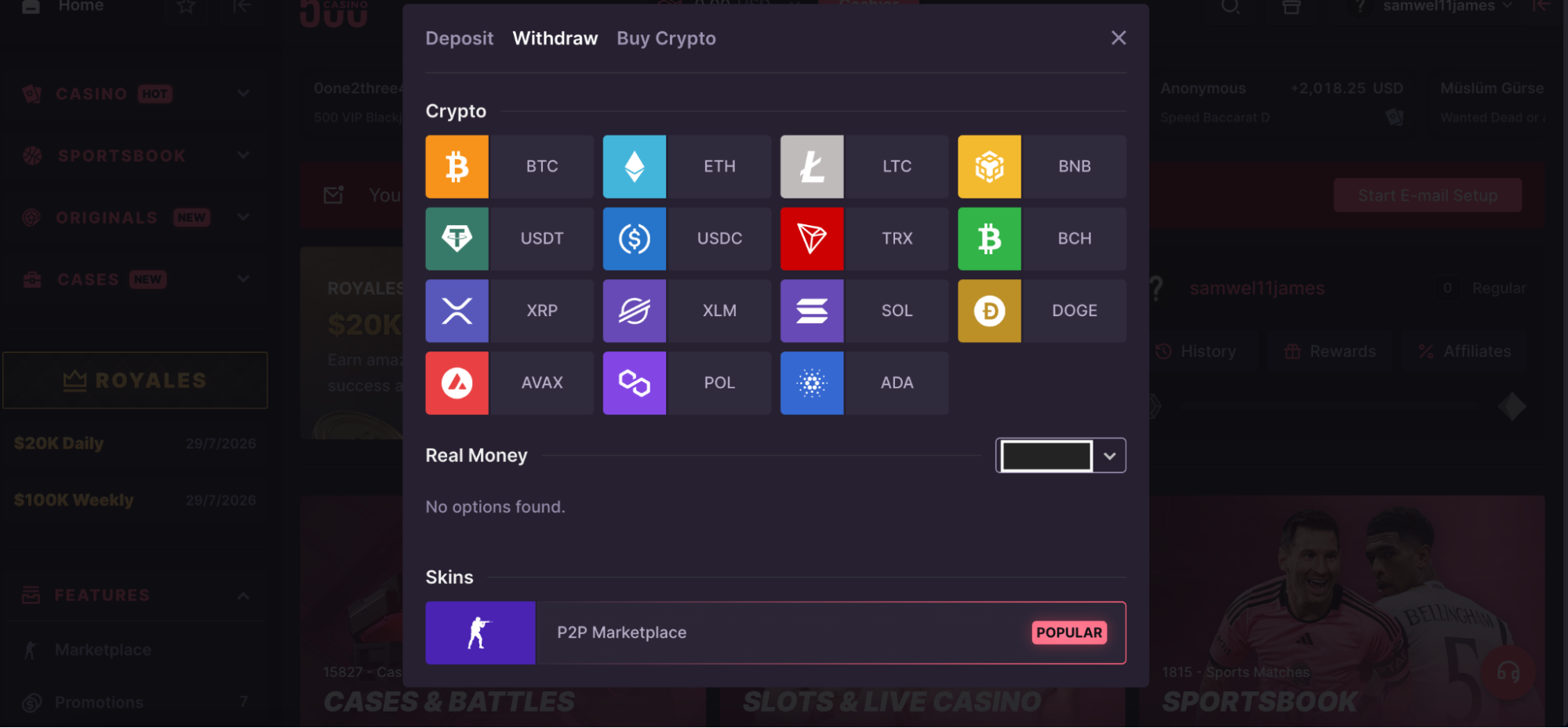
First, one thing has to be cleared up. Official pages don’t mention Gift Cards as a withdrawal method. Instead, gift cards count toward the MAIN balance. Eligible users can cash out via approved cryptocurrencies or P2P skins for CS2 and Rust.
The wider CSGO500 review explains how the platform works beyond withdrawals.
How to Withdraw from CSGO500
The process changes based on the selected method. Crypto withdrawals need a wallet address. Skin withdrawals use the P2P Shop and Steam.
Before you begin, make sure that your account and balance comply with the platform's requirements.
Withdrawal Requirements
CSGO500 highlights numerous factors that might influence withdrawal access.
Before making a request, please confirm that:
- Your account is 1+ level.
- You have already placed a deposit.
- Wagering requirements are complete.
- Your selected withdrawal method is backed by your specified balance.
- Your account currently has no security restrictions.
- Your details follow the platform’s Terms and Conditions.
Some deposits must be wagered before the balance becomes withdrawable. This means playing through the required value first. The rule may depend on the payment method and balance used.
Balance type is also important. Some crypto or skins may be able to be withdrawn from the MAIN balance. Withdrawals can be made in the same cryptocurrency or through certain skins. A lot of the time, bonus amounts have their own rules.
Quick Tip: Check the Account tab before you open the Cashier. It could show a problem with your email, Steam, Know Your Customer (KYC), or fraud.
When a limit is in place, do not keep sending new requests. Trying over and over won't get rid of it, and it might make the review harder to track.
This CSGO500 deposit guide shows you how each way of funding your account changes your amount and the rules for betting.
Step-by-Step Withdrawal Process
The process is simple in general, but each way has its own specifics.
For a cryptocurrency withdrawal
- Sign in to your CSGO500 account.
- Open the Cashier or withdrawal page.
- Select the balance you want to use.
- Choose an available cryptocurrency.
- Select the correct network, where required.
- Enter the receiving wallet address.
- Add the withdrawal amount.
- Review the fee and amount you will receive.
- Confirm the request.
- Track its status in your transaction history.
Check the wallet address carefully. One wrong character can send funds elsewhere. The same risk applies when you select the wrong network.
Do not assume two networks with similar names are interchangeable. Use the network supported by the receiving wallet.
For a P2P skin withdrawal
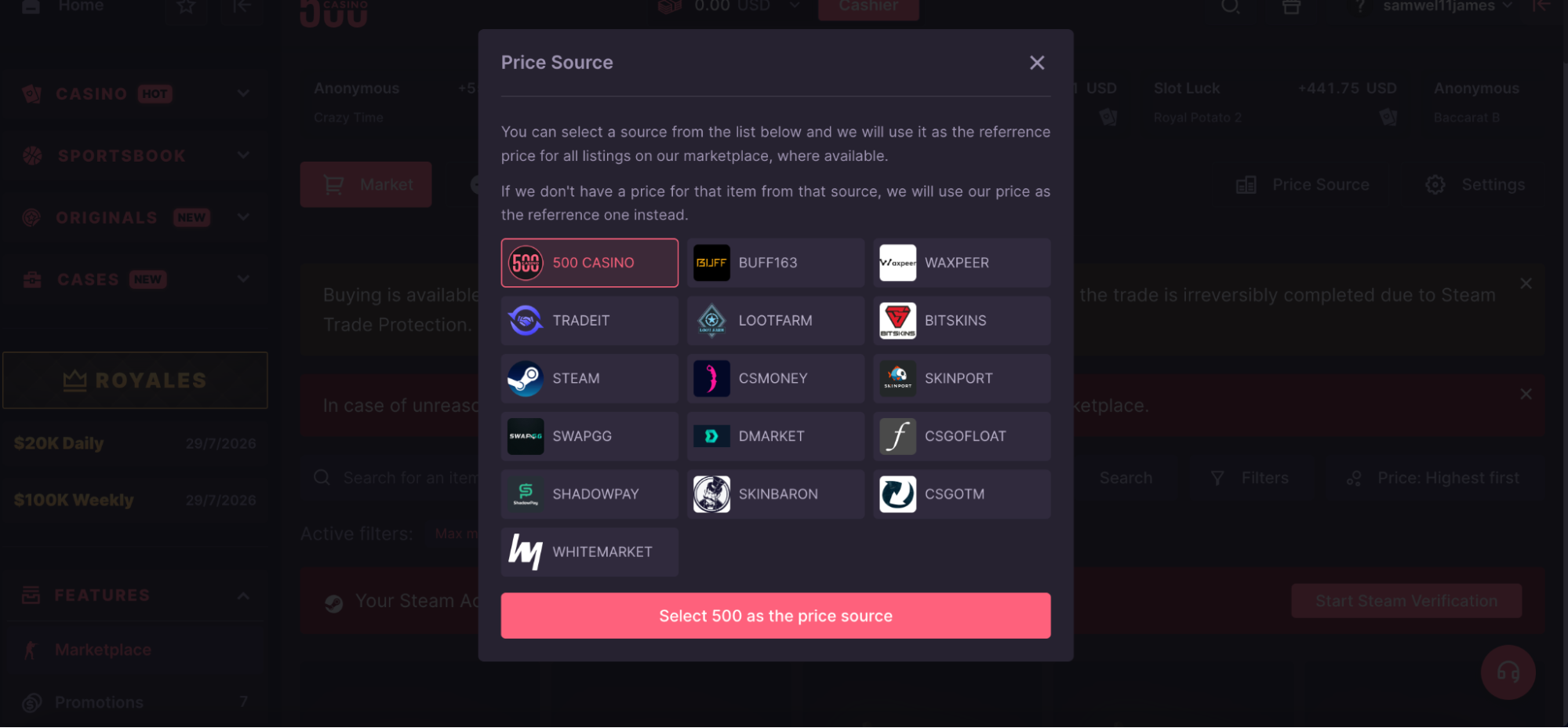
(P2P marketplace withdrawal methods available on CSGO500)
- Open the P2P Shop.
- Select an available CS2 or Rust item.
- Examine the item's specifications and pricing.
- Send in the request for withdrawal.
- Await confirmation of availability from the vendor.
- Launch the trade offer on Steam.
- Compare the offer to the specified listing.
- Use Steam to accept the correct offer.
- Return to CSGO500.
- Confirm that the item was received.
The item price is held while the request remains active. Both the buyer and seller have timed steps to complete.
Practical tip: Keep the CSGO500 page and Steam open during the trade. Missing a timer can cancel the order or send it into review.
Different time restrictions may be displayed on older Help Center pages. Pay attention to the timer that appears on your current request.
Account Verification
Verification is not necessary for every withdrawal made with CSGO500. However, depending on account restrictions, payment activity, location, or security concerns, the website could ask for checks.
The documents that may be requested are:
- A passport or a national identity card (front and back).
- A copy of a recent bank statement.
- A gas and electricity bill.
- Official government correspondence.
- Proof of payment ownership.
- A photo of the user holding a payment card, where requested.
Proof of address should normally show the full page. It should include your name, address, issuer, and issue date. Cropping too closely can hide details needed for review.
Cardholders may be required to undergo additional security checks. If the site requests a card snapshot, conceal sensitive digits where permitted. Keep the cardholder's name and any necessary numbers visible.
What verification can do
- Verify the identity of the account holder.
- Verify the ownership of the payment.
- Assist in preventing account abuse.
- Remove a few limits on withdrawals.
- Give the withdrawal review more time.
Completing verification does not ensure withdrawal approval. The request must still comply with all account, balance, and platform requirements.
Available Withdrawal Methods
The current CSGO500 withdrawal methods are focused on cryptocurrency and peer-to-peer skins. The Live Cashier displays the options available for a certain account and area.
| Method | How it works | Main point to check |
|---|---|---|
Cryptocurrency | Funds are sent to an external wallet | Address, network, fee, and minimum |
| CS2 skins | A seller sends an item through Steam | Trade URL, Steam status, and item details |
| Rust skins | A seller sends an item through Steam | Item availability and trade eligibility |
| Gift Cards | Used to fund the MAIN balance | They are not listed as a withdrawal method |
At this time, CSGO500 doesn’t feature any direct bank withdrawals on its public support pages.
Gift Cards
(CSGO500 Kinguin Gift Card Section)
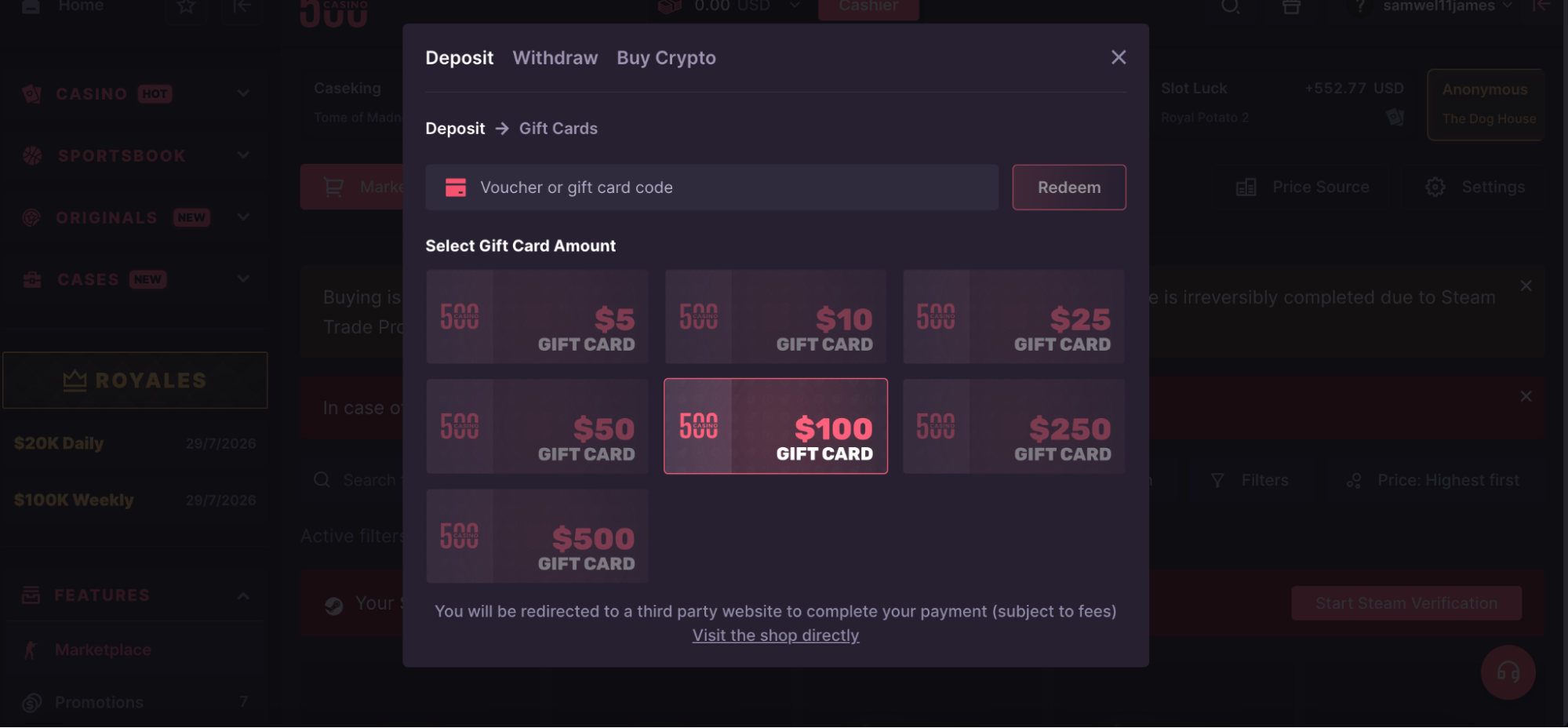
A CSGO500 gift card withdrawal is not currently documented. CSGO500 Gift Cards are used to deposit funds instead.
The platform supports certain Kinguin voucher codes. A user purchases the code, finds it in the Kinguin account, and enters it through the CSGO500 Cashier. The value is then added to the MAIN balance.
That balance may need to be wagered before withdrawal. Once eligible, it can be used through supported crypto or P2P skin methods.
What Gift Cards can do
- Add value to the MAIN balance
- Provide an alternative deposit route
- Allow users to redeem a supported voucher code
What they do not do
- Send money to a bank account
- Create a direct cash withdrawal
- Provide a new gift card during cashout
Voucher brands, values, and regional access can change. Check the Cashier before buying a code.
Promotional offers are covered separately in the CSGO500 promo code guide.
Coins
Many users search for CSGO500 Coins. Third-party sites may also use the term. Current official pages, however, do not describe a separate platform token called CSGO500 Coins.
The site instead uses different account balances:
- MAIN balance
- Cryptocurrency balances
- Bonus balances
Some players may casually call their displayed balance “coins.” That does not make it a new cryptocurrency.
A Bitcoin balance relates to Bitcoin funds. The MAIN balance is an internal account value that may support several withdrawal routes. Neither should be treated as a separate blockchain coin issued by CSGO500.
Simple distinction
| Term | What it means |
|---|---|
| MAIN balance | Internal platform balance used for eligible activities and withdrawals |
| Crypto balance | Balance linked to a specific cryptocurrency |
| Bonus balance | Promotional funds with separate rules |
| “CSGO500 Coins” | Informal wording rather than a clearly documented official token |
The CSGO500 Coins guide explains these balance terms in more detail.
Other Available Rewards (if applicable)
The main withdrawal choices are supported cryptocurrencies and P2P skins.
Official help pages have referred to assets such as:
- Bitcoin
- Ethereum
- Litecoin
- XRP
- USDT
The exact list can change. Networks may change too. Always use the live Cashier as the final source.
Steam-linked users can also request CS2 or Rust skins through the P2P Shop. This is not a cash payment. It is an item trade between users.
Other rewards may include rakeback, level rewards, daily cases, or VIP benefits. These normally enter a selected account balance first. Their later withdrawal depends on the balance type and any bonus terms.
Understanding CSGO500 Coins
The phrase CSGO500 Coins can confuse some users. The current approach focuses on distinct account balances rather than a specific casino currency.
Knowing which balance holds your funds allows you to select the appropriate withdrawal method.
What Are Coins?
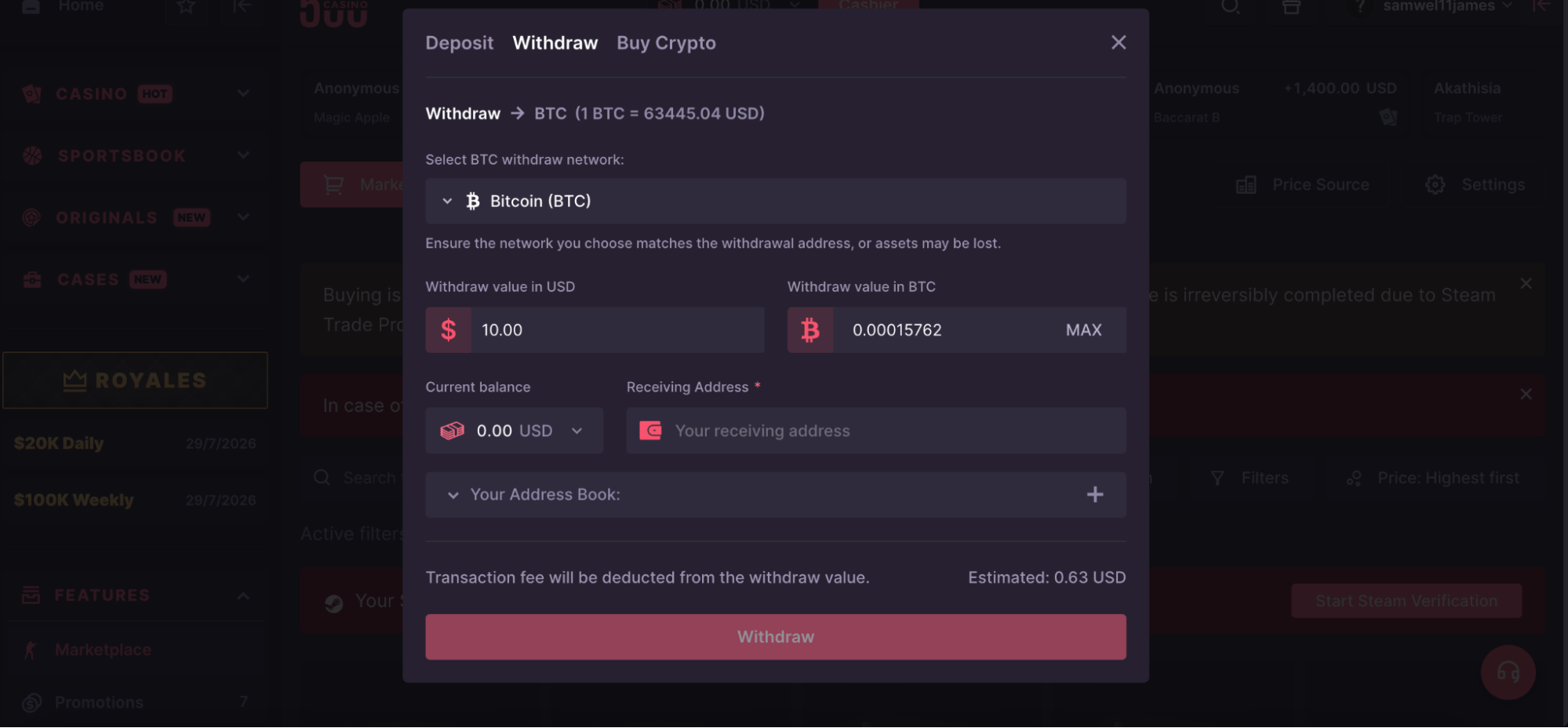
(CSGO500 withdrawal page showing balance convert option to crypto)
The current official pages do not refer to CSGO500 Coins as a fiat currency, cryptocurrency, or blockchain asset. Instead, deposits and incentives are held in separate account balances.
Here's how the funds can be assigned:
- Crypto deposits are credited to the respective crypto balance.
- Deposits of Skin, voucher, card, or gift card usually go into the MAIN balance.
- Claimed rewards are added to the specified balance.
- Bonus funds may be held in a separate bonus balance.
The balance belongs to one account. Users should not transfer funds to others to avoid withdrawal or wagering rules. Such activity can trigger limits or account checks.
When someone says “CSGO500 Coins,” look at the context. They may mean the MAIN balance. They may also mean an actual cryptocurrency balance.
How Coins Convert to Withdrawals
There is no set public exchange rate for CSGO500 coins. Instead, the site determines value based on actual account balances, cryptocurrency values, and current skin pricing.
The route usually works like this:
- MAIN balance → supported crypto or P2P skins.
- Crypto balance → matching cryptocurrency or eligible skins.
- Bonus balance → subject to its own terms and wagering rules.
For crypto, the Cashier displays the amount, fee, and estimated amount received.
For skins, the P2P listing shows the item price. That price can vary between sellers and may change with market demand.
Crypto pricing and network costs might also change. The value displayed now might not be the same as the value displayed later.
Before confirming, check three figures:
- The amount deducted from your balance.
- The cost for withdrawing or purchasing an item.
- The final amount or item received.
Do not assume an account balance can always be exchanged for bank cash or a Gift Card.
CSGO500 Withdrawal Limits
CSGO500 withdrawal limits may vary by asset, balance type, account status, KYC level, and current policy.
The public help center does not show one universal figure for every user.
Minimum Withdrawal
The minimum withdrawal is the smallest amount accepted by a method. It is not the same as the minimum deposit.
Crypto minimums may change based on:
- The selected asset.
- The blockchain network.
- Current network costs.
- Account or regional rules.
Very small requests may not be practical when network fees apply.
Skin withdrawals work differently. The lowest possible amount depends on the cheapest item listed in the P2P Shop. If no item fits your balance, you may need to wait for another listing.
Where to check
- The cryptocurrency withdrawal screen.
- The active cashier approach.
- The P2P Shop listing.
- Any caution displayed before confirmation.
Don't add extra money only to meet an assumed minimum. First, verify the correct minimum onsite.
Maximum Withdrawal
CSGO500 does not publish a maximum amount for every account and method.
A limit may depend on:
- The selected cryptocurrency
- The balance being used
- KYC level
- Account history
- Regional rules
- Current risk checks
- Available P2P inventory
P2P withdrawals also rely on supply. A user can only request items that sellers have listed.
A large request may enter review even when the balance is enough. This does not always mean it has failed. Check the status and follow any document request.
Watch out for outdated tables. Some third-party pages mix bonus limits with normal withdrawal limits. These rules are not always the same.
Daily and Monthly Limits
Current public help pages do not list one general daily or monthly withdrawal cap.
Account limitations may still be in effect. Withdrawal access may be affected by KYC status, bonus conditions, payment checks, and security inspections.
Open requests also lower your available balance. For example, a P2P order will reserve the amount indicated until the deal is completed or cancelled.
Do not split a large request to avoid a limit. Do not create another account either. CSGO500 allows one account per user.
Trying to bypass a restriction can lead to:
- More account checks
- Withdrawal feature limits
- Temporary account locks
- Account closure in serious cases
CSGO500 Bot and Withdrawal Delivery
Older guides often describe a CSGO500 bot. Current help pages describe a P2P marketplace instead.
In this setup, another user sends the Steam trade offer.
How the Bot Works
Current information does not show a CSGO500 bot approving withdrawal requests. It also does not show a bot making account decisions.
The P2P process involves a buyer, a seller, Steam, and CSGO500.
| Stage | What happens |
|---|---|
Request | The buyer selects and requests an item |
| Seller confirmation | The seller confirms the item is still available |
| Steam delivery | The seller sends the trade offer |
| Buyer confirmation | The buyer accepts and confirms receipt |
| Protected period | The seller’s balance may remain held during trade protection |
After the trade, an item may enter Trade Protected status. Under the current system, the seller’s balance may be held for seven days. A one-day grace period may follow for the buyer.
This protects against a later Steam trade reversal. It does not mean the buyer waits eight days to receive the skin.
Accepting the Trade Offer
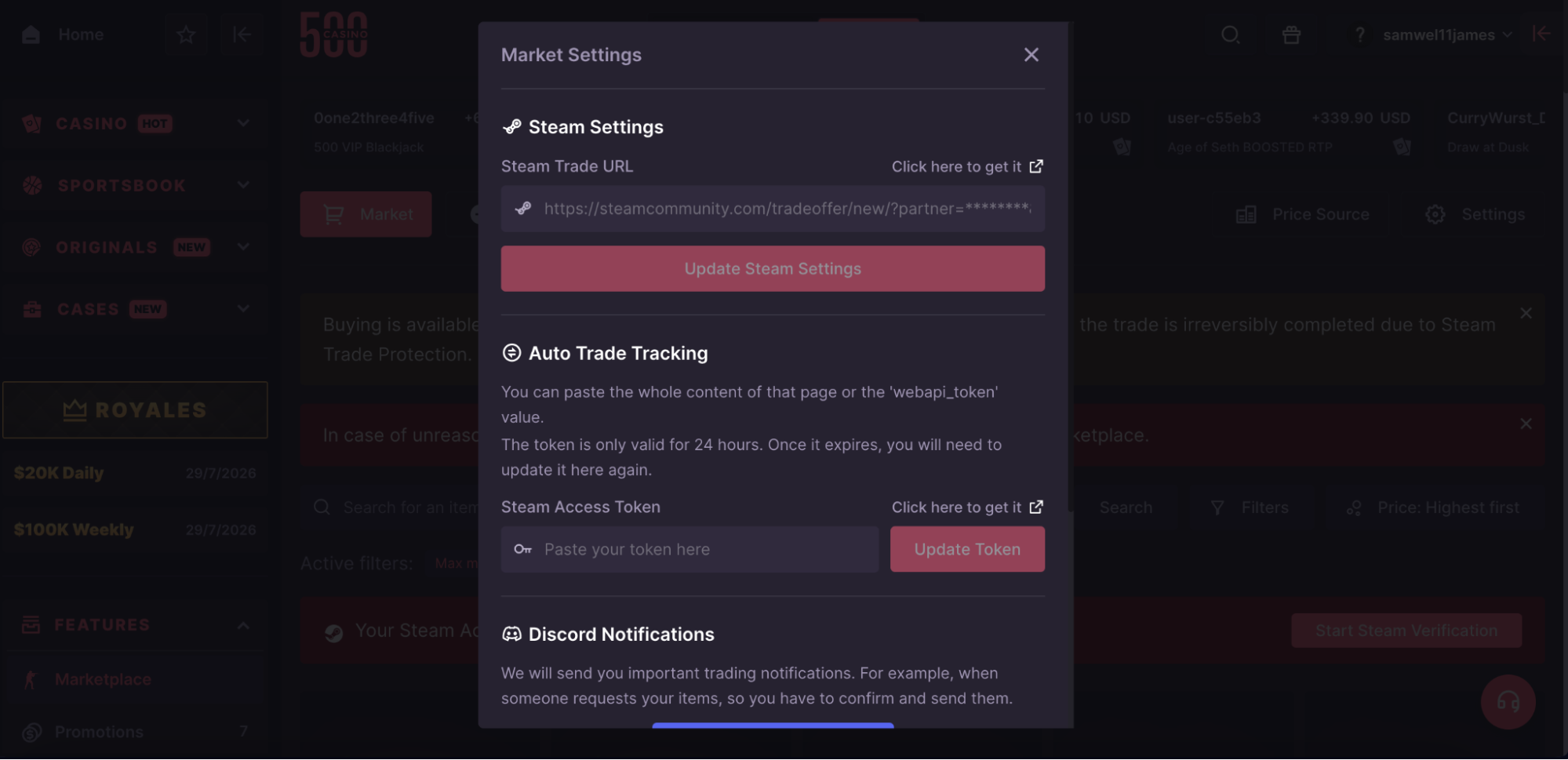
(Steam trade offer set up page)
Take time to thoroughly review the Steam trade offer. Do not trust it based just on a recognizable profile picture.
Use this checklist:
- Is this item similar to the CS:GO 500 listing?
- Is the skin name right?
- Is the wear/condition correct?
- Is the skin pattern matching where it matters?
- Is the sender the vendor you expect?
- Does the offer have any further requests?
- Do you have to mail something back?
Examine the sender's profile, level, account age, and public trading history. Scammers can mimic names, photographs, and profile designs.
Never accept an unexpected offer because someone claims to be staff.
After accepting the correct offer:
- Return to CSGO500.
- Confirm the item arrived.
- Check that the request status updates.
- Keep a screenshot if anything looks wrong.
Important: Steam trades can be difficult to reverse after confirmation. Review first. Accept second.
What to Do if the Bot Is Offline
The current P2P system may not use a CSGO500 bot to send the item. A missing offer often means the seller has not completed their step.
Try the following:
- Check the timer of the active request.
- Check if the vendor accepted the order.
- Refresh the Steam Trade Offers page.
- Verify the linked account on Steam.
- If provided, choose “I didn’t get an offer.”
- Wait for the cancellation or dispute process.
- Contact Support if the balance does not return.
If the seller never confirms, the request may cancel automatically. The balance should then return.
Do not start another order while the first remains active. Two open requests can make the issue harder to track.
Common CSGO500 Withdrawal Problems
Most withdrawal problems have an obvious reason. Status may reflect wallet error, account review, Steam restriction, or seller delay.
Please read the warning carefully before retrying.
Withdrawal Pending
A CSGO500 withdrawal pending message may appear as “Queued” for crypto. This can mean the transaction was sent and is waiting for blockchain confirmation.
Some requests may also need a security review.
P2P requests can remain pending while:
- The seller confirms the item
- The Steam offer is being sent
- The buyer accepts the trade
- A dispute is being reviewed
- The request waits for automatic cancellation
Check these places before contacting Support:
- Cashier history
- Account notifications
- Email inbox
- Steam Trade Offers
- The active P2P listing
- Blockchain records, when a transaction ID exists
Do not send the same request again.
A transaction ID can help you follow a crypto transfer on a block explorer. It also gives Support a clear reference.
Withdrawal Cancelled
A cryptocurrency request might not succeed due to:
- The wallet address is not valid.
- An unsupported network.
- Not enough qualifying balance.
- A restriction on the account.
- An unsuccessful account review.
- A technical problem.
Read the reason shown onsite. Fix that issue before trying again.
For a P2P request, cancellation can happen when the seller declines or misses the timer. The buyer may also cancel before the seller confirms.
Once the vendor approves it, the standard cancel option can disappear.
After cancellation, check:
- If the balance returns.
- If the request for the item was closed.
- If you see a limitation on the Account tab.
- Whether Support sent an email.
Contact Support if the balance does not return within the normal process.
Trade Hold Issues
Steam can delay or block a trade even when CSGO500 accepts the request.
Common causes include:
- A recent password change
- A newly added device
- A Steam Guard change
- A new mobile authenticator
- A trade ban
- An account cooldown
- Restricted privacy settings
Steam usually shows the reason and waiting period.
Check the exact message inside Steam. CSGO500 cannot remove a hold set by Valve.
Make sure the linked Steam account can receive offers. Review the Trade URL and inventory settings too.
Quick tip: Check Steam restrictions before choosing a skin. It is easier than resolving a failed trade afterward.
Verification Problems
A lot of the time, verification fails because the file that was sent is unclear or missing parts.
Before submitting the document, ensure:
- It is not expired.
- All sides as asked are included.
- The whole page is displayed.
- Your name is readable.
- Shows date of issue.
- The address matches your account information.
- The image is clear, with no glare or blurriness.
- No critical corners are cut.
For the precise request, check your email and the Account tab. It may be related to KYC, payment ownership, Steam, email verification, or fraud checks.
While the review is in progress, avoid creating another account.
Only use the official account page to upload files. Identity documents should never be sent to an unidentified social media account.
Fees and Important Conditions
Before finalizing a withdrawal, verify the transaction fees, balance type, amount received, wagering status, regional regulations, and Steam settings.
These details can change. The live site should always come first.
Withdrawal Fees
CSGO500 states that users cover cryptocurrency network fees. The fee is deducted from the amount received.
The cost may change by asset and network. Some assets may show little or no fee at certain times.
| Check | Why it matters |
|---|---|
| Network fee | Reduces the amount received |
| Selected network | Must match the receiving wallet |
| Minimum amount | Can change by asset |
| Final amount | Shows what should reach the wallet |
| Current status | Confirms whether the request was sent |
Review the fee before every transaction. Do not rely on an old fee table.
Public help pages do not list one universal P2P withdrawal fee. Skin prices come from live listings. Any extra charge should appear before confirmation.
Stop if the figures do not meet your expectations.
Regional Restrictions
Different countries may have different withdrawal procedures. Not every user will have access to certain currencies, networks, coupons, games, or skin choices.
Local laws may also restrict access. Users must be of legal gambling age in their nation or region.
Do
- Use your genuine account information.
- Sign in from your current location.
- Review the live Cashier.
- Review the regional messages.
- Contact Support if you believe a limitation is incorrect.
Do not
- Use a VPN to mask your location.
- Fake address information.
- Create a new account.
- Assume that a withdrawal option is available everywhere.
- Use unofficial bypass instructions.
Giving false information can lead to account checks or limits.
Steam Trade Requirements
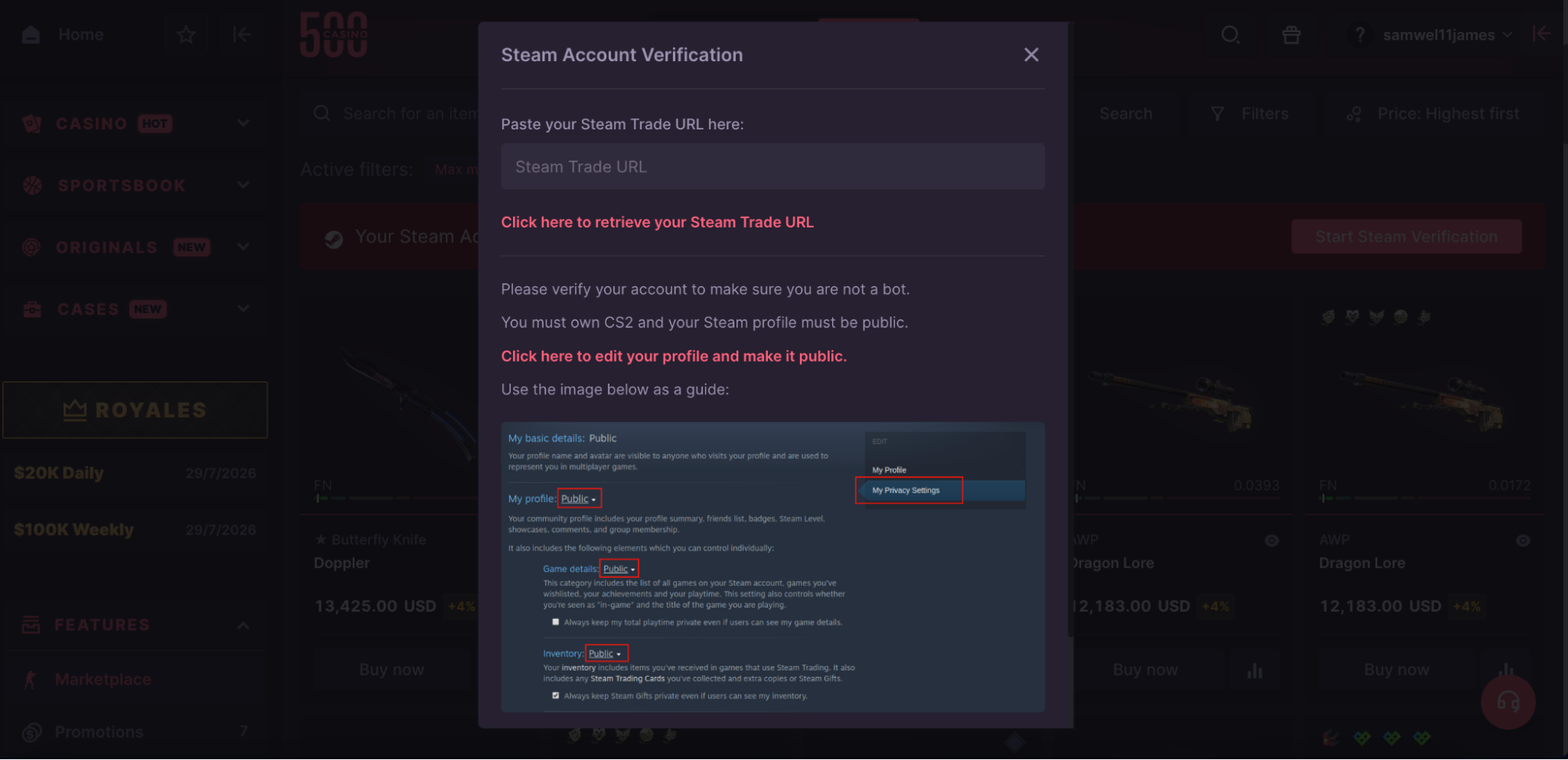
(CSGO500 steam account verification page)
A skin withdrawal needs a Steam account linked to CSGO500. That account must be able to receive trade offers.
Before requesting a skin, confirm:
- The correct Steam account is linked.
- The Trade URL is valid.
- Steam Guard is active.
- No trade hold is in place.
- Recent security changes have cleared.
- Inventory settings allow the trade.
- The account is not trade-banned.
One wrong Trade URL may stop delivery or send the user to the wrong account flow.
Do not share your Steam login, password, or security codes with anyone.
Steam trades move items only. They do not send bank funds or Gift Cards.
Tips for Successful Withdrawals
A few checks can prevent most problems:
- Be sure to use the right balance.
- Get your account to the right level.
- Make sure that you have made a deposit.
- Finish any bet requirements that need to be made.
- Pick the right cryptocurrency and network.
- Carefully copy the wallet address.
- Check the fee and the total amount you got.
- Update your Steam Trade URL.
- Look over Steam Guard and any trade holds.
- Check each skin against its listing.
- Don't let more than one request open at once.
- Review the error messages carefully before you try again.
Crypto withdrawals may take longer when the network is crowded. Skin withdrawal timeframes vary depending on the vendor, Steam, and whether a dispute arises.
Never trust private messages from anyone who claims to be a CSGO500 employee. Contact the team solely via the official Support channel.
Frequently Asked Questions
Can I withdraw without verification?
It depends. CSGO500 does not indicate that all users must complete KYC before a withdrawal. But the platform could do checks based on payment activity, location, account limitations, or security concerns.
You may be asked to submit an identity document and current address. Check your email and the Account tab for the detailed instructions.
Why is my withdrawal pending?
Your crypto withdrawal may be pending for network confirmation or security assessment. A P2P request might be subject to the seller, a Steam trade offer, buyer confirmation, or dispute resolution. Check the timer and status. Do not submit a second request until the first request is closed.
How long does a CSGO500 withdrawal take?
There is no set withdrawal time for any method. The time of cryptocurrency transactions is determined by the asset, network traffic, and account checks. A transfer may be sent rapidly, but it still requires blockchain confirmation. The seller and Steam determine the timeframe of P2P transfers. Check the live request status rather than relying on a set estimate.
What is the minimum withdrawal amount?
CSGO500 does not post a set minimum amount for all withdrawal options. The minimum amount varies depending on the coin, network, account balance, or skin price. Before you confirm, make sure the Cashier or P2P listing is still active. A withdrawal minimum is not equivalent to a deposit minimum.
Can I cancel a withdrawal?
It all depends on the request's status. A P2P withdrawal may typically be canceled before the seller confirms it. Once verified, the option to cancel may disappear. Crypto transfers are often irreversible after they are sent to the blockchain. If an active request has a major mistake, please contact Support immediately.
This article is informational. CSGO500 may update its methods, limits, fees, verification rules, and regional access. Check the official site before submitting a request.
Users must meet the legal gambling age in their location. Gamble responsibly. Never spend money you cannot afford to lose.
Ready to open CSGO500?
Use the official referral link, check the latest promo terms, and only play with funds you can afford to lose.